
 Radalt White Paper
 The Building Knows Everything
How Talk To Building (TTB) Gives Voice to the Silent Expert — the IFC Model
Construction projects run on expert judgement. A veteran can glance at a 3D model and tell what is wrong, what is missing, and roughly what it will cost to fix. That judgement is locked in a few experienced heads, applied manually, one issue at a time — and the people who need it most often get it too late. Yet the answers were there all along: the IFC model already carries the building's geometry, relationships, and data. It knows what is there — and, read properly, it reveals what is missing. The model is a silent expert on every project, and no one asks it.
A new generation of AI tools promises to change this, but nearly all of them are grounded in 2D drawings — a derived artifact in which the model's relationships and data are flattened into lines and text that AI struggles to make sense of. Even the tools that read IFC use it only for automated checking; when they chat, they chat with the drawing sheet.
So talk to the building itself — Talk To Building (TTB). Integrated into Radalt Toolkit, TTB delivers three things: a summary report the moment an IFC file opens, a hygiene report tailored to the reader's role — exportable to BCF, PDF, or Excel — and an AI chat that answers natural-language questions with a filtered 3D view of the answer.
1. Introduction
In our first white paper, The Missing Middle, we examined the gap in IFC tooling: enterprise platforms are priced out of reach for most of the industry, open-source libraries require programming, and free viewers are passive. Radalt Toolkit was built to close that gap with seven free, no-code IFC utilities.
This paper addresses a second, deeper gap — not in tooling, but in expertise. The architecture, engineering, and construction (AEC) industry's most valuable asset is expert judgement, and it does not scale. The problem is three-fold:
- People are locked out. Key stakeholders — contractors, owners, facility managers — are excluded from the model until it is too late to act. Contractors routinely receive design models still full of clashes; they were not in the room when the model was coordinated.
- Processes are manual. Workflows are fragmented across single-purpose tools — a checker, a costing tool, an authoring platform — none of which talk to each other. Every review is performed by hand, one issue at a time.
- Information dies in transit. Data degrades as it moves between stakeholders and software. A model exported from one tool loses data on its way into the next; loss is built into every handover.
Large language models can now carry the kind of reasoning that previously lived only in expert heads. The question is what the AI is grounded in — and that choice separates every tool in this market.
2. The 2D Ceiling
A 2D drawing is a projection — a layout generated from the model to support construction on site. The model's substance is in there, but flattened into lines and text — legible to a trained human eye, with the structure stripped away:
- Relationships — which wall hosts which door, which duct serves which room — become dimension lines, callouts, and drafting convention
- Semantic data — element types, materials, property sets, system assignments — becomes text annotations scattered across sheets
- Three-dimensional geometry — the spatial facts that determine whether two elements clash, connect, or clear — becomes flat projections and section marks
An AI grounded in drawings must reconstruct all of that meaning back from lines and text — pattern-matching on the sheet, inferring what the drafter implied. It struggles to answer "which of those walls are load-bearing?" or "which assets have no maintenance record?" because the sheet only hints at what the model states. IFC (ISO 16739) carries the same relationships, data, and geometry in a digital, machine-readable schema — nothing to reconstruct, nothing to infer — which makes it the natural grounding for building intelligence.
Drawings also confine the AI to one window of the building's life: the construction-document phase. The IFC model, by contrast, is alive from design through operations. An AI grounded in the model can follow it there; an AI grounded in drawings cannot.
And the IFC models are already there. IFC deliverables are mandated or standard practice across the UK, the EU, the Nordics, Singapore, Australia, and the Gulf — millions of professionals already produce the very artifact this intelligence needs. The grounding for building AI does not have to be created; it is sitting in project folders today.
3. The Competitive Landscape
3.1 The First Wave of Construction AI
A cohort of startups now applies modern AI to construction — design review, code compliance, drawing checks, permit assessment. Each is credible in its niche, and all share the same boundary: those that offer a conversation ground it in 2D drawings and documents; the rest offer no conversation at all. None lets the user talk with the IFC model.
An AI design assistant inside Autodesk Revit with a chat interface — but the conversation is grounded in drawings, the workflow is locked to the Revit ecosystem, and the reach ends at the design phase.
AI building-code compliance with chat — users ask about code requirements, and the answers are grounded in drawings and regulations, across design and permitting. It reads IFC, but only to run automated checks; the conversation never touches the IFC model.
AI review of construction drawing sets in preconstruction — surfacing missing information and inconsistencies across sheets. There is no conversation at all: findings arrive as reports, and the drawing set is the product's entire universe.
AI-driven planning and permit assessment. Reads IFC for automated rule checking, but offers no way to ask a question, and its scope is the permit gate — a single moment in the building's life.
3.2 Head-to-Head
Every AI tool in this market with a chat interface talks to the drawing. Only Radalt talks to the IFC model.
| Tool | Reads IFC | Natural-language chat | Chat grounded in | Phase reach | Ecosystem |
|---|---|---|---|---|---|
| Structured AI | Revit only | Yes | 2D drawings | Design | Revit-locked |
| UptoCode | Checking only | Yes | 2D drawings | Design / permit | Mixed |
| Firmus | No | No | — | Preconstruction | Drawings |
| Archistar | Checking only | No | — | Permit | Mixed |
| Radalt (TTB) | Native | Yes | The IFC model | Design → operations | Open IFC |
This comparison reflects Radalt's good-faith understanding of publicly available product information as of July 2026. Capabilities evolve; readers should verify current features directly with each vendor. All product names and trademarks are the property of their respective owners; no affiliation or endorsement is implied.
The pattern across the table: the existing tools check one thing, at one phase, on yesterday's artifact. The space they all leave empty — a conversation grounded in the IFC model itself, across the building's whole life, open to every stakeholder — is where Talk To Building sits alone.
4. Talk To Building
4.1 Overview
Talk To Building (TTB) is an AI dimension integrated into Radalt Toolkit, layered on top of its seven foundational IFC utilities. The moment a file loads, every entity, relationship, and property is parsed locally. TTB then speaks first — no query to compose, no role to configure, no training required. Open a model and read the report.
4.2 What TTB Delivers
TTB delivers three levels of intelligence, each building on the last — from first orientation, to quality judgement, to open conversation.
Level 1 — Summary Report ("What am I looking at?")
Generated the moment a model opens. The summary covers identity (building name, type, primary structural material, authoring software, IFC version), scale (storeys, total elements, gross floor area), and a detection of every distribution system present — HVAC, plumbing, electrical, communications. Pure description; no judgement yet.
Level 2 — Role-based Hygiene Report ("What's wrong with it?")
The user picks a role once — Architect, Structural Engineer, MEP Engineer, BIM Coordinator, Contractor, or Facility Manager — and every IFC thereafter opens with a hygiene report: a check of the model's data health — what is incomplete, misnamed, unassigned, or missing — scoped to what that role actually checks for. An architect sees uncategorised objects, missing materials, and generic names; a facility manager sees MEP assets missing warranty, maintenance interval, manufacturer, or serial data; a BIM coordinator sees a combined report across every loaded discipline, with inter- and intra-discipline clashes. One report, no prep — walk into the meeting ready.
Every finding then exports in one click — to BCF (2.1 or 3.0) for round-tripping into authoring tools, PDF for reporting, or Excel for tracking — each with 3D screenshots embedded per check, captured automatically by isolating and framing the flagged elements.
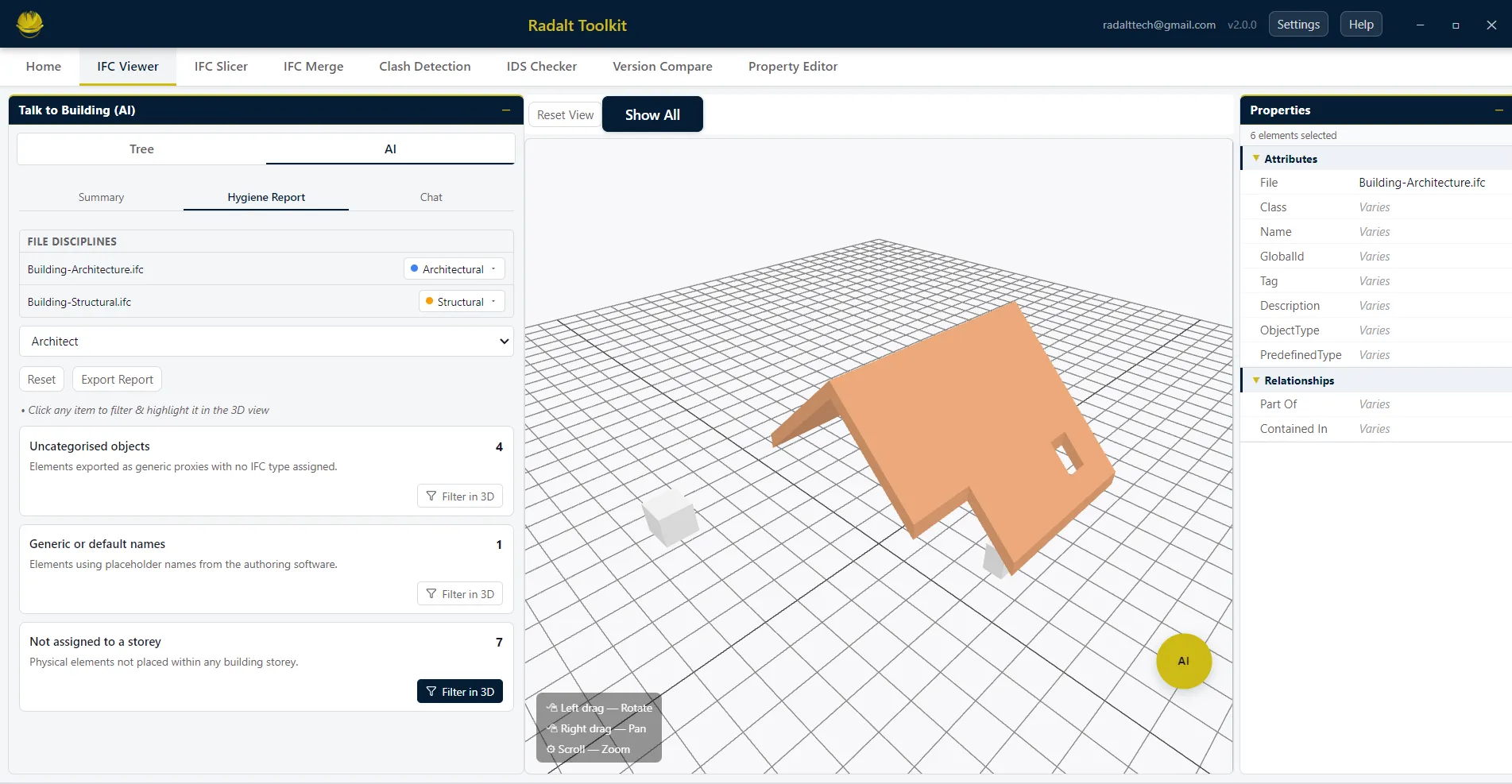
Level 3 — AI Chat with Filtered 3D View ("I have more questions.")
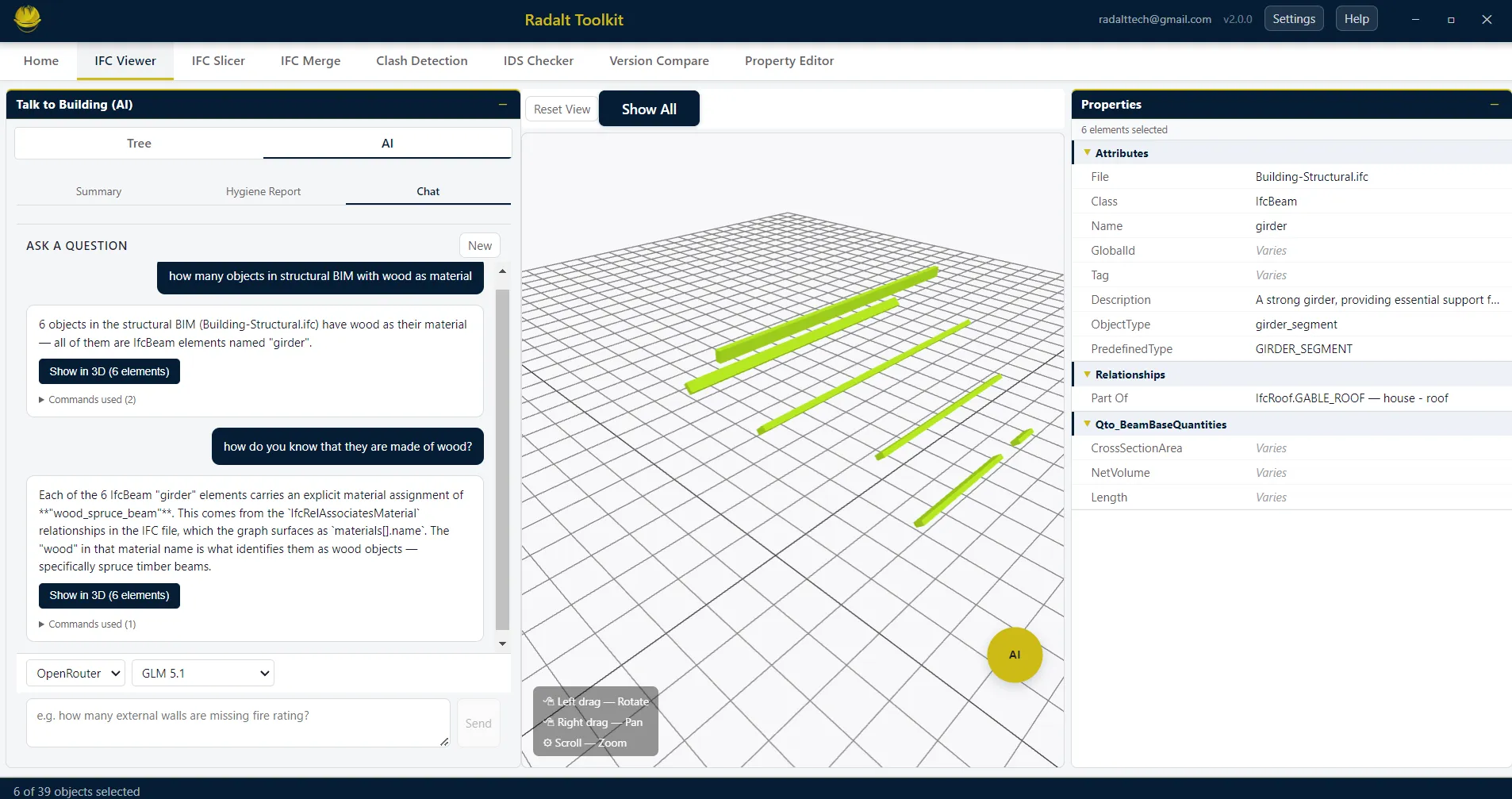
After the auto-reports run, the conversation continues. A chat panel — backed by a model graph built in the background on file open — answers natural-language questions, and the 3D viewer is the AI's output canvas: the view filters to the relevant elements and the camera flies to frame them. "Show me only the third-floor clashes." "Which of those walls are load-bearing?" "Where is the isolating valve for the east wing?" The chat lets users select the AI of their choice — Claude (Anthropic) or DeepSeek directly, or OpenRouter for access to a wider range of models — switchable from the settings panel.
A further capability is planned: jumping from any finding or chat result directly into the Property Editor with the flagged elements pre-selected, to fix the missing data in place.
4.3 Under the Hood: The Model Graph
A raw IFC file is millions of interlinked entities; handed to a language model directly, it either overwhelms the context or invites hallucination. TTB's foundation is a proprietary model graph: on file open, Radalt builds a structured representation of the model, locally, that the AI can reason over losslessly. The language model is a commodity; the model graph is what makes it work on a building.
Three consequences follow from this architecture:
- The file stays local. Parsing happens entirely on the user's machine. The chat sends only the structured data needed to answer a question — never the IFC file itself. No cloud upload, no telemetry.
- Bring your own key. TTB connects to the user's own AI account — a Claude (Anthropic) or DeepSeek API key directly, or OpenRouter for access to a wider range of models. Providers and models are switchable from the settings panel; Radalt never sits between the user and their AI provider.
- Answers are grounded. Because every reply is resolved against the model graph, the AI cites elements that actually exist — and the 3D viewer can navigate to them as proof. Figure 2 shows this in practice: asked to justify its answer, the AI points to the specific material relationships in the file, and the viewer isolates the six elements it counted.
4.4 Pricing
TTB ships inside Radalt Toolkit at no cost, alongside the seven foundational utilities. The only expense is the user's own AI provider usage, billed by their provider under their own key.
5. Use Cases
Each scenario below walks through the levels as a single flow — summary for orientation, hygiene for judgement, chat for the follow-up.
5.1 BIM Coordinator — Meeting-ready in Minutes
Architectural, structural, and MEP models load before the weekly coordination meeting.
Confirms what arrived — disciplines, storeys, element counts, systems present.
Inter-discipline clashes and data gaps, across every loaded model.
PDF with 3D screenshots for the meeting; BCF back to each discipline's authoring tool.
An afternoon of manual preparation becomes a file-open and two clicks.
5.2 Contractor — Constructability Without a BIM Team
No BIM software, no trained reviewer — open the design model and pick the Contractor role.
Every hard clash that cannot be built as modelled — highlighted in 3D, in plain language.
"Which of these clashes involve structural steel?" — the 3D view filters to exactly those.
Constructability risk is understood before the tender goes in.
5.3 Facility Manager — Handover Readiness on Day One
Before accepting handover, open the delivered model and pick the Facility Manager role.
MEP assets missing warranty, maintenance interval, manufacturer, or serial number.
Gaps returned before occupation — not after the first breakdown.
"Which pumps are still under warranty?" "Who manufactures the chillers?"
5.4 Owner — Questions Without an Interpreter
No BIM consultant on the calendar — just the model.
The first questions answered unprompted — storeys, systems, scale.
Plain-language questions — and the viewer flies to the answer.
6. The Broader Significance
The industry's response to unscalable expertise has so far been to automate fragments of it — a code check here, a drawing review there. Each fragment helps, but each is bounded by its grounding: a tool built on drawings cannot follow the building past the construction-document window, and a tool built for one specialist cannot serve the rest of the project team.
Grounding AI in the open IFC model removes both bounds at once. The same model — and the same encoded judgement — carries from design through construction into operations, and every stakeholder can query it in plain language. Talk To Building is a first, practical step toward that: expert judgement, available to whoever opens the file.
7. Conclusion
The AI tools arriving in AEC are real progress, but they share a ceiling: they reason over the drawing, a derived artifact, at a single phase, for a single kind of user. The building's full description — geometry, relationships, data — already exists in the IFC model, and that is where building intelligence belongs.
Talk To Building answers from the IFC model itself: an automatic summary on open, a hygiene report tuned to the reader's role, findings packaged for the next step, and a conversation in which the 3D viewer does the pointing. They check one thing, at one phase, on yesterday's artifact. TTB gives the silent expert a voice — and makes the whole building intelligible, for its whole life.
By downloading, you agree to the End User Licence Agreement.
References
- Radalt. The Missing Middle — Democratizing IFC Workflows for Every BIM Professional. radalt.ai/whitepapers/radalt-toolkit
- buildingSMART International. IFC — Industry Foundation Classes. buildingsmart.org
- ISO 16739-1:2018. Industry Foundation Classes (IFC) for data sharing in the construction and facility management industries.
- buildingSMART International. BIM Collaboration Format (BCF). buildingsmart.org
- IfcOpenShell. Open source IFC library and tools. ifcopenshell.org
- Third-party product characterisations reflect Radalt's good-faith understanding of publicly available information as of July 2026 and may not reflect subsequent product changes. All trademarks are the property of their respective owners.
For enquiries: [email protected]